pdf, 14.15 MB
pdf, 14.15 MB
  • 21 pages
  • Two commands on each A4 page
  • Plus three sizes of cut outs (Small, Medium. Large)

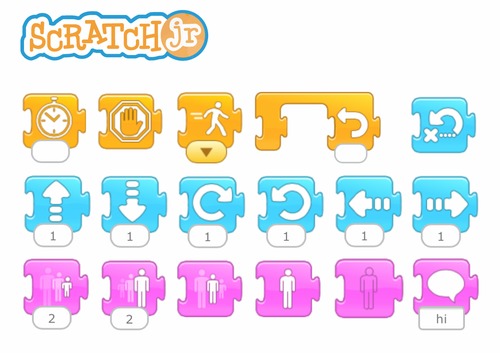
Using cut-out blocks to teach coding and sequencing skills relevant to Scratch Junior can be a hands-on and engaging approach for children. Here’s how it can be done:

Mental Recall: Provide children with physical printed “blocks” representing different Scratch Jr commands and actions. Challenge students to pick a card and then explain the action it represents.

Sequencing Activities: Encourage children to arrange the cards in a sequence to create a series of actions or commands. Start with simple sequences, such as moving a character from one point to another, and gradually increase complexity as children become more proficient.

Algorithm Design: Teach children to design algorithms using the blocks to solve specific tasks or challenges. For example, they can design algorithms to navigate a maze, collect items, or complete a puzzle within Scratch Junior.

Debugging Practice: Introduce the concept of debugging by intentionally introducing errors into the sequences of blocks. Encourage children to identify and correct these errors to achieve the desired outcome.

Storytelling and Creativity: Encourage children to use the blocks to create interactive stories, games, or animations within Scratch Junior. They can sequence events, movements, and dialogues to bring their creative ideas to life.

Collaborative Projects: Foster collaboration among children by assigning group projects where they work together to design and implement coding sequences using the blocks. Collaboration not only enhances coding skills but also promotes teamwork and communication.

Reflection and Iteration: After completing coding activities using the blocks, encourage children to reflect on their process. Ask questions such as what worked well, what challenges they encountered, and how they could improve their sequences. Encourage iterative refinement of their coding designs based on reflection.

Integration with Scratch Junior: Once children are comfortable with coding concepts using the cards and manipulatives, transition to using Scratch Junior on a device. They can apply their understanding of sequencing and coding to create projects digitally within the Scratch Junior environment.

By using cut outs and flash cards to teach coding and sequencing skills, children can develop a strong foundation in computational thinking and problem-solving while having fun and being actively engaged in the learning process. This approach also provides a tangible and accessible way for children to understand abstract coding concepts before transitioning to digital platforms like Scratch Junior.

Get this resource as part of a bundle and save up to 56%

A bundle is a package of resources grouped together to teach a particular topic, or a series of lessons, in one place.

Bundle

Scratch Jr - Command matching, Planners, Debugging Worksheets and Class Decorations

ScratchJr Complete Classroom Resource Bundle Everything you need to plan, teach, practise, debug and reflect on ScratchJr coding — all in one resource bundle. This comprehensive ScratchJr bundle brings together 7 practical classroom resources designed to support young learners as they develop coding skills, problem-solving strategies and confidence with ScratchJr. Whether you are introducing ScratchJr for the first time, developing students’ sequencing skills, or looking for activities to reinforce learning, this bundle provides ready-to-use resources for lessons, independent work, assessment and classroom displays. 📦 What’s Included? 1. ScratchJr Matching Exercises – 4 Differentiated Sets Help students recognise and match ScratchJr coding blocks, sequences and outcomes through four levels of differentiated activities. 2. ScratchJr Student Project Planning Sheets Structured planning templates that help students develop an idea, plan their characters and code, and organise their project before they start coding. 3. ScratchJr Debugging Challenges Engaging challenges that encourage students to identify coding errors, test solutions and develop early computational thinking and debugging skills. 4. ScratchJr Coding Sequences & Explanation Activities Activities focused on understanding coding sequences and explaining how and why a program works. 5. ScratchJr Reflection Pages Simple reflection activities that encourage students to think about what they created, what they learned, what worked and what they could improve. 6. ScratchJr Classroom Decorations Coding-themed classroom display resources to create an engaging ScratchJr learning environment. 7. ScratchJr Coding Blocks – Cut-Outs & Flashcards Printable ScratchJr coding blocks for demonstrations, sequencing activities, unplugged coding, games and student reference. 👩‍🏫 Ideal For * Primary / Elementary ScratchJr lessons * Introducing coding to beginners * KS1 / Early Years coding activities * Independent and paired coding activities * Computational thinking and problem-solving * Differentiation and extension * Lesson starters and consolidation * Student reflection and assessment * Coding displays and classroom organisation 💡 A Flexible ScratchJr Toolkit Use the resources individually or combine them to create a complete learning sequence: Learn the blocks → Plan → Code → Debug → Explain → Reflect The activities can be revisited throughout the year as students become more confident and begin creating increasingly complex ScratchJr projects. 💰 Bundle Saving 7 resources — £21.50 when purchased separately Complete bundle — £9.95 Save £11.55 compared with purchasing the resources individually. A practical, reusable collection for teachers introducing and developing ScratchJr coding in the primary classroom.

£9.95

Reviews

Something went wrong, please try again later.

This resource hasn't been reviewed yet

To ensure quality for our reviews, only customers who have purchased this resource can review it

Report this resourceto let us know if it violates our terms and conditions.
Our customer service team will review your report and will be in touch.