Dyscalculia & Early Number Sense Intervention Suite
Target core numerical deficits at the foundational level with this comprehensive suite of three macro-free, infinitely generating spreadsheet utilities. Designed specifically for specialists, teachers, and intervention leads supporting learners with dyscalculia or severe mathematical gaps, this bundle provides a cohesive, research-backed progression from non-symbolic quantity recognition to abstract symbolic mapping.
**The SEN Theory & Pedagogical Framework**
Learners with developmental dyscalculia typically struggle with a deficit in the Approximate Number System (ANS)—the innate, non-symbolic cognitive utility used to estimate and compare quantities. When standard instruction jumps immediately to abstract Arabic numerals, these students experience cognitive overload because they lack the underlying analog map to ground those symbols.
This toolkit systematically addresses this deficit by mirroring the natural cognitive hierarchy of mathematical acquisition:
Perceptual Subitising ──> Magnitude Discrimination ──> Symbolic Transcoding
(Tool 1: Workout) (Tool 2: Comparative) (Tool 3: SNAP Game)
* **1: Preventing the "Slow Counting" Trap**
A primary obstacle in dyscalculia remediation is a reliance on manual tracking (counting arrays one-by-one by touching the screen or page). While this yields the correct answer, it consumes vital working memory and prevents the brain from developing automaticity.
**The Solution:** The optional flash and blanking modes limit visual exposure. This structural boundary intercepts manual counting habits, forcing the brain to rely on visual grouping and true subitising.
* **2: Isolating Surface Area Bias**
Dyscalculic learners frequently rely on visual proxies—such as total ink density or the physical surface area an array occupies—to guess a quantity, rather than evaluating numerical magnitude.
**The Solution:** The tool randomizes dot configurations, sizes, and layout styles. This strips away visual anchors, ensuring that any student evaluation is purely based on numerical value.
* **3: Systematic Symbolic Transcoding**
The final frontier of early number sense is moving from analog magnitude to symbolic processing speed.
**The Solution:** Transitioning from non-symbolic evaluation (dots vs. dots) to dual-coded validation (dots vs. Arabic numerals) trains the precise neurological translation paths needed for long-term mathematical fluency.
**What’s Included in the Bundle**
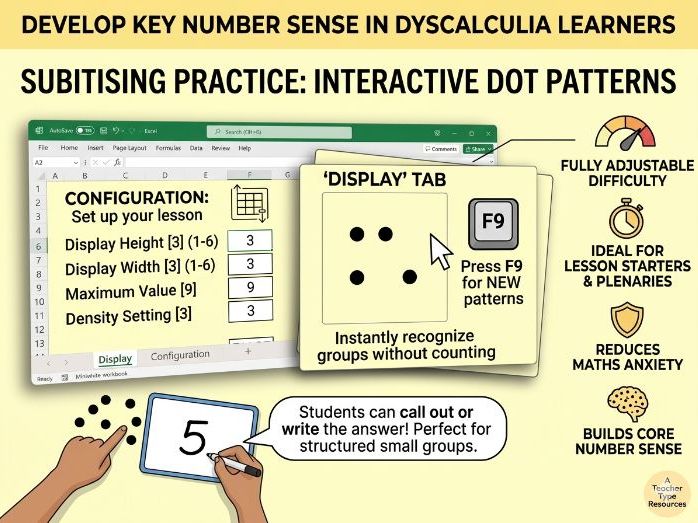
* **1. Subitising Magnitude Workout:** Focuses on perceptual and conceptual subitising. Trains the brain to instantly recognize small sets (1–4) and structured groups without manual counting.
* **2. Comparative Magnitude Workout:** Focuses on ANS tuning and volume isolation. Features side-by-side randomized dot arrays to force relative magnitude choices while explicitly neutralizing area bias.
* **3. Subitising SNAP Matching Game:** Focuses on symbolic transcoding and processing speed. Merges non-symbolic dot matrices with abstract Arabic numerals under a gamified, high-engagement loop with adjustable match frequencies (25%, 50%, or 75%) that adapt behind the scenes to keep gameplay smooth and engaging.
**Practical Classroom Benefits**
* **100% Macro-Free Architecture:** Built purely on native spreadsheet logic. It requires no software installations, runs instantly in excel, and easily bypasses restrictive school network security filters.
* **Infinite, Instant Generation:** A single keystroke refreshes the page to update the layout instantly. This provides teachers with an exhaustive supply of fresh configuration sets, removing lesson preparation overhead entirely.
* **Granular Difficulty Scaffolding:** Seamless configuration controls allow users to alter grid heights, widths, density levels, and maximum values (from tight 2x2 blocks up to 6x6 arrays). This allows practitioners to micro-adjust the cognitive load to match a student's exact processing boundary.
* **Flexible Delivery Formats:** Perfectly optimized for high-intensity 1-to-1 SEN interventions, low-anxiety whole-class lesson starters using mini-whiteboards, or non-competitive group diagnostic tracking using answer paddles.
*Bonus* - a copy of our 5-dot counting patterns