


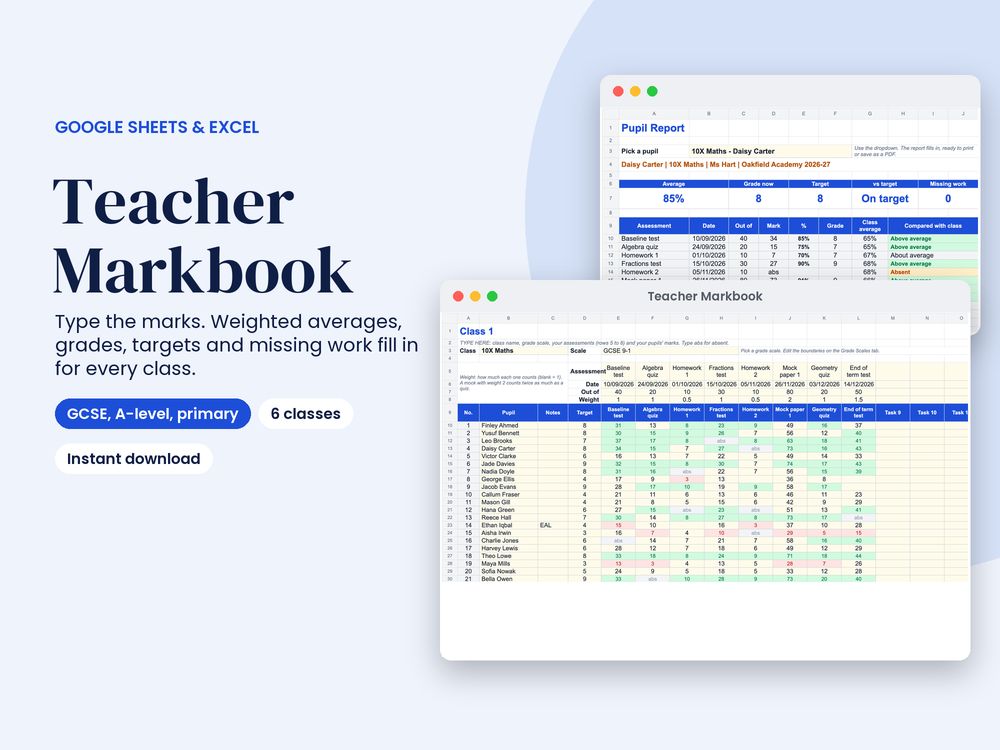


Type the marks. The markbook does the rest: weighted averages, grades, working-at vs target and missing work, for up to 6 classes.
Most gradebook templates are American: letter grades, semesters and one class per file. This one is made for UK teachers. It comes with GCSE 9-1, A-level A* to E and primary WTS / EXS / GDS grade scales (plus simple Emerging to Mastered bands), and you set the % boundaries yourself, so it matches your department. Each class picks its own scale, so your Year 11s, Year 13s and a primary class can all live in one file. A US edition (letter grades with + and -, A-F and standards-based 1 to 4) is included. Works in Google Sheets AND Excel.
WHAT’S INSIDE (10 tabs)
- 6 class tabs: class name and grade scale, up to 16 assessments (name, date, out of, weight) and 36 pupils with notes (SEN, PP, EAL), target grade and marks. Type raw marks: the weighted average %, grade now, above / on / below target, pieces done and missing work fill in. Type abs for absent and it won’t count against them
- Class average, highest and lowest mark and number marked for every assessment
- Low and high marks are colour coded (you choose the %)
- Overview: every class side by side, plus a list of the pupils furthest below their target
- Pupil Report: pick a pupil from the dropdown for one page with every mark, %, grade and how it compares with the class average, and a comment box. Print it or save it as a PDF for parents’ evening or report writing
- Grade Scales: 4 editable scales, up to 14 grades each
- Setup and Start Here: plain-English instructions
Comes with 3 sample classes so you can see how it works, and instructions for clearing them.
WHAT YOU GET
- 2 versions: UK (markbook, GCSE, A-level and primary scales, dd/mm/yyyy) and US (gradebook, letter grades, mm/dd/yyyy)
HOW IT WORKS
- Google Sheets: upload the .xlsx to Google Drive, open it, then File > Save as Google Sheets
- Excel: just open it (Excel 2010 or later, Windows or Mac, or Excel for the web)
- Type in the cream cells. Everything else updates on its own
- Plain formulas only: no macros, no add-ins, no subscriptions
The GCSE and A-level boundaries are examples to get you started: exam boards set new ones every year, so type the ones your department uses. Grades are a guide to working-at level, not official exam grades.
Something went wrong, please try again later.
This resource hasn't been reviewed yet
To ensure quality for our reviews, only customers who have purchased this resource can review it
Report this resourceto let us know if it violates our terms and conditions.
Our customer service team will review your report and will be in touch.
£4.99