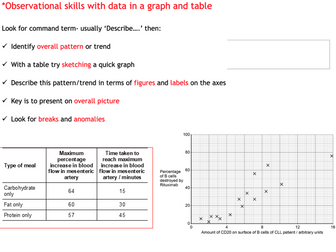
This is a one hour exam preparation lesson to show A Level Biology students how to answer exam questions which require them to interpret data.
It begins by looking at how to describe data that’s presented in a table or a graph, and then how to explain data or draw conclusions from the data. There are lots of example exam questions which require students to practice each type of skill so that patterns in the structure to their answers and the mark scheme can be highlighted.
Examiner’s reports for all questions are also included on the PowerPoint and in the student resource pack so that they can read them and reflect on their own answers as they work.
Resources included: Powerpoint with all exam questions, mark schemes and examiner’s plus student resource which includes the same.
A-level Maths Data Presentation Complete Pack: 148 questions, 23 worked examples, 2 practice papers and 9 full PowerPoint lessons.
A statistics topic pack on data presentation and interpretation for A-level Mathematics, for teachers who want ready-to-teach lessons with matching practice, students revising on their own, and tutors who need a structured course. It covers histograms with unequal class widths, cumulative frequency, box plots, outliers, spread and coding.
What is in the pack
9 complete lessons (PowerPoint, 29 to 37 slides each): retrieval starter, objectives, key ideas, worked examples revealed step by step, mini-whiteboard questions with answers, independent and exam-style practice, an exit ticket and speaker notes on every slide.
Workbook (89 pages): knowledge pages, 148 questions graded Foundation, Developing and Exam standard, 23 fully worked examples, a diagnostic, a mistake clinic and retrieval quizzes.
Answer edition (80 pages): full worked solutions with mark tags, so students can mark their own work.
Two timed practice papers (30 marks each) with a separate mark scheme for each.
Also included: a knowledge organiser with key diagrams, double-sided flashcards, an illustrated teacher guide with a lesson-by-lesson plan, and editable Word versions of the workbook, papers and mark schemes.
The workbook and papers include 47 exact diagrams, each drawn to match its question. All data sets in the pack are invented.
Topics covered
Location and spread; Grouped data; Histograms; Cumulative frequency; Box plots and outliers; Coding and combining data; Interpreting and comparing; Large-data-set style questions; Scatter diagrams.
How to use it
Teach each topic with its lesson deck, set the matching workbook section as practice, and use the answer edition for self-marking. The diagnostic shows where to start, and the two timed papers work well before an assessment. The Word and PowerPoint files are fully editable.
Please note
Covers data presentation and interpretation from the statistics content of A-level Mathematics. Quartile conventions, outlier rules and calculator notation differ between boards and calculators: check your specification. Independent resource, not endorsed by any exam board. All data are invented.
Mark schemes use Study Hack’s own mark tags (M1, A1, B1) and are not an exam board mark scheme. This is an independent resource, not endorsed by any exam board; check it against the specification you teach. All questions are original Study Hack material.
I have fully completed and gone over the Digital Information Technology COMPONENT 2: Collecting, Presenting and Interpreting Data Pearson Set Assignment Jan 2027.
This is a great guide to help you complete the new released Jan 2027 paper.
Great tool to assist the marking process so you can check and cross reference against the provided answers.
Included is a fully completed Excel Spreadsheet with all completed tasks for 2A 2B and 2C as well as a complete ‘how to guide’ on PowerPoint. Additonal slides on the PowerPoint guide for Tables, Sparklines and Line Graphs in the answers section.
Also updated the completed Spreadsheet with this included.
Fully completed examplar answers for task 3 errors patterns and trends, as well as a guide on responding well to task 1, task 1 is generic and can be used on any PSA, not just the Jan 2027.
Fully completed suggested answer Task 1, Task 2ABC, and Task 3 from the current specification. (not to be shared with students).
A bonus task to help students with task 2C - this task uses generic data, not the PSA data and can be shared with the students. This will guide students on how to create tables, charts and sparklines.
Updated completed spreadsheet and ppt with 1 small fix. 13/10/26
A set of questions on interpretation and presentation of data, observation, fair testing, use of different keys. Some questions can give you ideas for lab activities.
Please find within this download:
A detailed and engaging PowerPoint, Differentiated (SEN, LA, MA, HA & Mastery) Worksheet with Answer Sheet for a complete lesson on this National Curriculum Statement: Interpret and present data using bar charts, pictograms and tables.
The PowerPoint has the following features:
→ Differentiated starter activity (plus extension)
→ Extremely logical and simplistic explanations with animated examples and pictures to aid learning
→ Clear, detailed and engaging activities built into the PowerPoint to aid your AfL as you teach
→ Tasks linked to and based around identifying information from bar charts, pictograms and tables
→ Beautiful animations, images and graphs used to draw children’s attention to the key messages of the PowerPoint
→ Learning Objective and differentiated success criteria which is clearly visible for all children
→ Animated count-down timer so children know how long they have left of the lesson (this is also good for teachers as it reminds you when to do mini-plenaries/feedback/etc).
The Word Document has the following features:
→ Differentiated activities on one sheet from SEN, LA, MA, HA and Mastery Challenge
→ Coloured activity boxes to help you quickly assign tasks to children
→ Learning objective and short date (which automatically updates to the day you open the document)
→ Differentiated success criteria that link with the PowerPoint
→ Answer sheet included for all questions
Explore our other Year 3 Statistics Lessons:
Interpret and present data using bar charts, pictograms and tables
Solve one-step and two-step questions (for example ‘How many more’ and ‘How many fewer?’) using information presented in scaled bar charts and pictograms and tables
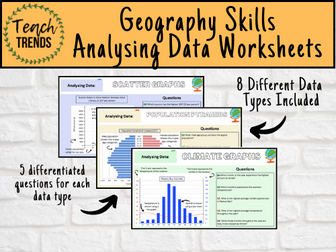
Enhance your pupils’ geographical skills with a series of interpretation and analysis sheets and questions. This resource includes 8 PowerPoint slides with corresponding questions all focused on a different data presentation method. Ideal for preparing your pupils for exams and revising analysis skills. The high quality slides include annotation, examples and five scaled-ability questions.
The data presentation skills included in this resource are:
Climate Graphs
Population Pyramids
Choropleth Maps
Scatter Graphs
Pie Charts
Demographic Transition Model
Proportional Symbols Map
Divided / Stacked Bar Charts
Resource downloaded in PDF and PowerPoint Format.
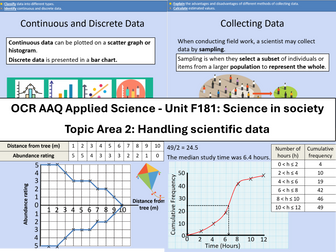
Course: OCR Level 3 Alternative Academic Qualification Cambridge Advanced Nationals in Applied Science.
Unit F181: Science in society
Topic Area 2: Handling scientific data
2.1 Types of scientific data
2.2 Collecting scientific data
2.3 Storage and presentation of scientific data
2.4 Interpreting data
Qualitative and quantitative data
Continuous and discrete data
Data from observations and
measurements
Primary and secondary data
Observation and measurement
from experiments
Surveys
Sampling
Random
Systematic
Estimation
Cohort studies
Meta-studies
Computer modelling
Personal database
National database
International database
Scatter and line graph
Bar chart
Histogram
Pie chart
Kite diagram
Cumulative graph
Box and whisker plots
Draw conclusions
Accept or reject a hypothesis
Inform further scientific
investigation
Mathematical skills include:
Calculate the mean, median, mode, range (e.g. height of group of organisms, number of stomata in a plant).
Determining the intercept and/or gradient using y = mx + c.
Calculating the rate of change from a graph with a linear relationship (e.g. rate of transpiration).
Drawing a tangent to a curve on a graph to calculate the rate of change (e.g. amount of product produced against time, at a fixed concentration of enzyme).
Calculate the standard deviation of a set of data.
I made this up after working on similar resources to find information from data. There is a much simpler version at the bottom for children with AEN. Most children were able to work on one step problems when interpreting data. Once this is completed I will give them one and two step problems. More able will be able to write their own.
A really fun and unusual lesson using a piece of sheet music to collect data using a tally chart, interpret from a tally chart, present the data in a bar chart and pie chart and further interpret the data using a real-life question. Very enjoyable and no knowledge or prior understanding of sheet music needed. Also Christmas themed (the song used is Jingle Bells) so great for engaging students at that time of year.
Make AS Statistics Data Presentation & Interpretation Escape Room easier to teach and easier for learners to revisit with this practical, ready-to-use resource. Clear explanations, purposeful practice and flexible classroom use help you move from first teaching to confident application.
What’s included?
Someone has manipulated the evidence — can your students reconstruct the original statistical picture? The Forensic Data Lab: Distorted Evidence transforms AS Statistics Data Presentation & Interpretation into an extended forensic investigation. Students tackle 30 challenges across five zones, covering averages and spread, quartiles and IQR, outliers, coded data, standard deviation and variance, histograms and frequency density, grouped data, interpolation and statistical interpretation. 02_Forensic_Data_Lab_HARDER.pdf The challenge goes beyond calculation: students must interpret evidence, distinguish useful results from deliberate decoys and cross-reference their findings to construct the final code. Perfect for AS Statistics revision, end-of-topic assessment, collaborative problem solving or enrichment. Includes all challenges, evidence tokens, master decoder and complete teacher answers.
Flexible classroom use
Use it for whole-class teaching, collaborative problem solving, enrichment, intervention or revision.
If this resource helps your teaching or tutoring, I’d really appreciate a quick review. Your feedback helps other teachers find useful resources and supports my small resource shop. Thank you!
Includes:
- Finding and sorting Information
- Displaying Information (line graphs, tally charts, bar charts/graphs, Carroll diagrams and Venn diagrams)
- Code breakers
- Interpreting data
Can be adapted for upper KS1 and lower KS2
Comprehensive lesson containing a full presentation and model answers included.
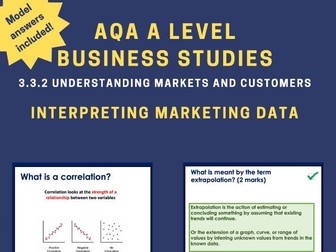
The lesson outlines all the specification of 3.3.2 Understanding markets and customers
This is lesson 5/8 in 3.3.2
This lesson teaches the following content:
Correlations
Scatter Charts
Extrapolation
Confidence Intervals
Key features of this lesson include:
• Retrieval practice questions
• Pre-Formatted slides (with the option of editing them too with slide master)
• PeCanPie Essay Planner Free
• Answers given
• Real life examples
• Scaffolding for lower ability
• Updated to new specification
• All questions based on real questions that have appeared in exams
Click on the link below to check out a FREE AQA A Level Business lesson to get an idea of what this resource entails:
Price Elasticity of Demand
https://www.tes.com/teaching-resource/resource-13054401
I have fully completed and gone over the Digital Information Technology COMPONENT 2: Collecting, Presenting and Interpreting Data Pearson Set Assignment June 2026.
This is a great guide to help you complete the new released June 2026 paper.
Great tool to assist the marking process so you can check and cross reference against the provided answers.
Included is a fully completed Excel Spreadsheet with all completed tasks for 2A 2B and 2C as well as a complete ‘how to guide’ on PowerPoint.
Fully completed examplar answers for task 3 errors patterns and trends, as well as a guide on responding well to task 1, task 1 is generic and can be used on any PSA, not just the June 2026.
Fully completed suggested answer Task 1, Task 2ABC, and Task 3 from the current specification. (not to be shared with students).
06/1/2026 - added a task to help students with task 2C - this task uses generic data, not the PSA data and can be shared with the students. This will guide students on how to create tables, charts and sparklines.
06/1/2026 - added a new Slide on the PowerPoint guide for Tables, Sparklines and Line Graphs in the answers section.
Also updated the completed Spreadsheet with this included.
This resource is an introduction to statistics.
It contains nine subjective questions on presentation of data in a frequency table, it essentially deals with interpretation of data presented in a frequency table.
It is a good resource to use as an exit card or even as an review of previous knowledge.
I hope you find it useful.
THANK YOU
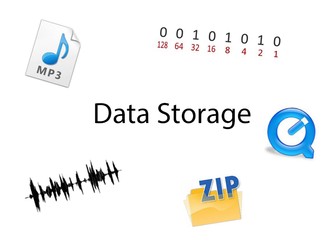
Hi… This resource is specifically based against the IGCSE Computer Science syllabus, but is suitable for any Data Storage module. It includes some knowledge tests at the beginning and leads on to creating 5 groups to work on a presentation about a different element of Data Storage. The group worksheets can be handed out or sent electronically and each has a series of keywords to prompt research. Each group is challenged with answering one Big Question and explaining it to the class at the end of the lesson.
If you find the resource useful please leave a review so that others can find it.
HackDragn
Presenting Data Pack includes the following :
Bar Charts and Pictograms - Drawing and interpreting
Draw Pie Charts - Draw given the angle, Calculate the angle and draw
Percentage Bar Diagrams - Draw and interpret % bars for real contexts
Stem and Leaf Diagrams - order, draw, interpret, median, back to back
Scatter Diagrams - Draw and interpret - Includes team relay activity
Averages and Range from data and charts - calculations
Cumulative frequency and box plots - draw cf, median and quartiles, draw box and interpret
Histograms - Draw , interpret, and calculate the mean
One Set of Data - Revision task using one set of data .... produce pie chart, mean, frequency polygon, cumulative frequency, box plot and histogram.
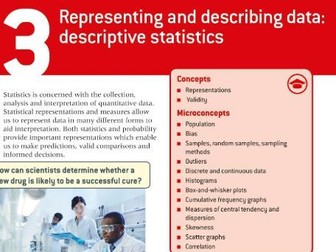
This PowerPoint follows the Oxford textbook.
The following content is covered throughout the PowerPoint. I have also added a few extra concepts which can be used in students Internal Assessments (IA). For example, I spend a little time looking at the skewness formula, different ways of calculating outliers, 1.5 x IQR or 2 X SD, skewness in box plots, etc.
Univariate data
* qualitative vs quantitative
* continuous vs discrete
* which representations are used for specific types of data
* primary and secondary data
* choosing a good sample
* sampling bias
* reliability vs validity
* skewness
Questionnaires
* biased questions
Measures of central tendency
* mean, meadian, mode
* outliers
* un-grouped and grouped
* how to use the GDC
* combined mean
Measures of dispersion
* range, quartiles, IQR, standard deviation
* normal distribution curve
* skewness
* different formulas for sample and population for SD
* how to use the GDC
* effects on mean and SD
Sampling techniques
Presentation of data
Bivariate data
* scatter graphs
* correlation
* introduction into the line of best fit (leading into chapter 6)
Throughout the PowerPoint there are worked examples and student exercises. There are also multiple links to various classroom and interactive activities using GeoGebra and Desmos Classrooms. As well, I have included links to certain Youtube videos to help with using the GDC.
I made this worksheet for Year three children. They have to label the horizontal bar chart, complete the tally chart and then answer some True or False questions and explain how they know, to prove it. The questions are differentiated. LO and SC on the worksheet to help with marking.
Will save lots of time.
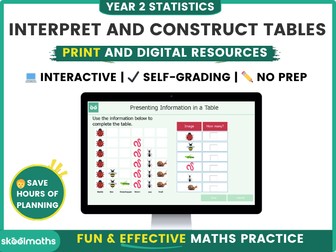
Introducing this comprehensive digital maths resource designed specifically for Year 2 students to master the art of presenting and reading information from tables in statistics! With this interactive learning tool, students will develop a solid foundation in data representation and analysis while having fun along the way.
Save over 20% when you buy it as part of the Tables and Tally charts Bundle
Our Year 2 Statistics Digital Resource provides a dynamic and engaging learning experience that captures students’ attention from start to finish. The carefully crafted content is aligned with the curriculum standards, ensuring that students are equipped with the necessary skills and knowledge needed in interpreting and representing data using tables.
Through a series of interactive lessons and activities, your year 2 students will learn how to create, interpret, and use tables effectively. They will discover the significance of tables as a quick and efficient way to record and count data. With the guidance of our intuitive interface, students can practice creating tables in a virtual environment, enabling them to sharpen their skills at their own pace.
To enhance the learning experience, our Year 2 Statistics Digital Resource incorporates interactive self-marking activities using vibrant graphics. Students can put their knowledge to the test with interactive challenges that reinforce their understanding of tables. Additionally, our resource offers progress tracking features, allowing students and educators to monitor performance and identify areas for improvement.
Whether used in the classroom or at home, our Year 2 Statistics Digital Resource provides an immersive learning environment that supports students’ growth in statistics.
Other related resources in this category include:
Carroll and Venn diagrams
Block Diagrams
3.Tally Charts
This resources enables children to read and interpret information from pictograms, make comparisons and ask questions about data. It includes worksheets linked to WRM fluency tasks 1 & 2 and reasoning questions.
WRM Small Step: pictograms
Curriculum links:
-Interpret and present data using bar charts, pictograms and tables.
-Solve one-step and two-step questions [for example, ‘How many more?’ and ‘How many fewer?’ using information presented in scaled bar charts and pictograms and tables.
Enjoy!
Your feedback is always welcome x
Please find within this download:
A detailed and engaging PowerPoint, Differentiated (SEN, LA, MA, HA, Mastery and Greater Depth) Worksheet with Answer Sheet for a complete lesson on this Year 4 statistics statement: interpret and present discrete and continuous data using appropriate graphical methods, including bar charts and time graphs
The PowerPoint has the following features:
→ Differentiated starter activity and extension
→ Extremely logical and simplistic explanations with animated examples and pictures to aid learning
→ Shows exactly how to interpret and present discrete and continuous data using appropriate graphical methods, including bar charts and time graphs
→ Learning Objective and differentiated success criteria which is clearly visible for all children
→ Animated count-down timer so children know how long they have left of the lesson (this is also good for teachers as it reminds you when to do mini-plenaries/feedback/etc).
The Word Document has the following features:
→ Differentiated activities from SEN to greater depth
→ Coloured activity boxes to help you quickly assign tasks to children
→ Learning objective and short date which automatically show the correct date
→ Differentiated success criteria that link with the PowerPoint
→ Answer sheet included for all questions
Explore our other Year 4 Place Value Lessons:
Interpret and present discrete and continuous data using appropriate graphical methods, including bar charts and time graphs
Solve comparison, sum and difference problems using information presented in bar charts, pictograms, tables and other graphs


 Quick View